
How to Make Your Own Subliminals on iPhone
The easiest way to make your own subliminal on an iPhone is an app built for it. In SelfStudio you type your goal, it writes the affirmations, you pick a sound like rain, and the track keeps playing with your screen locked. If you would rather not install anything, the free subliminal maker does the same thing in Safari. And if you want a file in your own voice, you can record your affirmations in Voice Memos and mix them in GarageBand.

What you need before you start
Every method starts with the affirmations. Pick one goal per subliminal and write 5 to 15 short lines in the present tense, as if the goal is already true. "I am calm and prepared in interviews" works better than "I will stop being nervous", because it names what you want instead of what you are trying to avoid. Our list of subliminal affirmations by goal has more than 80 examples you can copy and edit, or the app can write them for you.
You also need a background sound you could happily hear for twenty minutes. Steady sounds like rain, ocean waves, a waterfall or brown noise hide a voice best.
Method 1: The SelfStudio app, about a minute
- Download SelfStudio and type your goal in one sentence, for example "I get the marketing job at the studio."
- It writes present-tense affirmations from that sentence. Edit any line, delete the ones that do not feel right, or write your own.
- Pick a sound such as ocean, rain, a fireplace or brown noise, and choose how far under it the voice sits. You can also add an alpha, theta or delta binaural beat if you use headphones.
- Press play and lock your phone. It keeps playing in the background, overnight included.
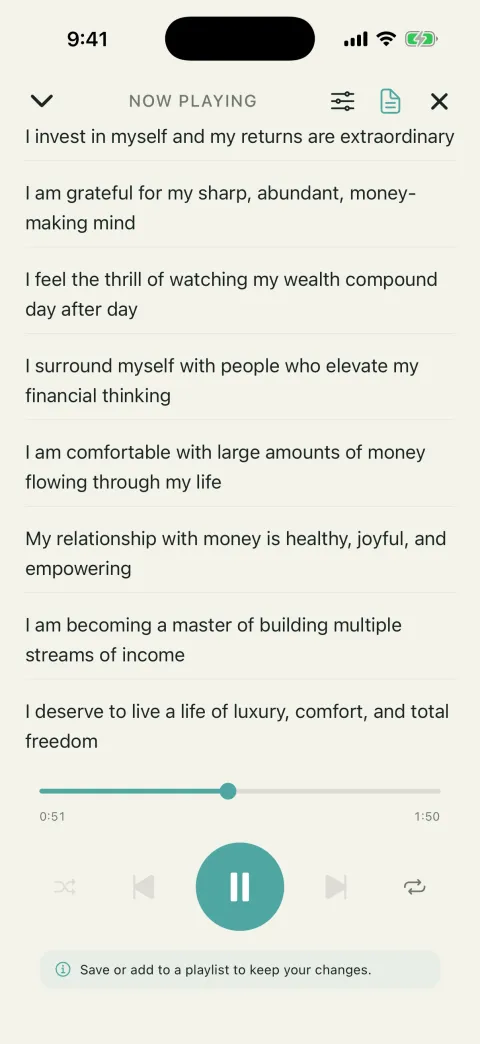
Your affirmations, written from your goal and fully editable.
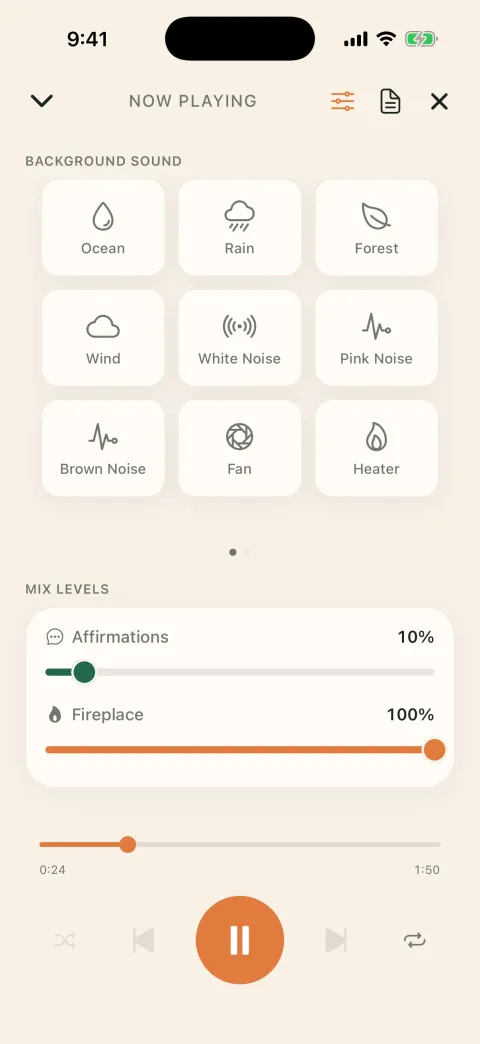
The mixer: choose a background sound and set your affirmations under it.
Your subliminals are saved, so replaying one takes a tap, and you can download them too. SelfStudio is free to start, and Pro unlocks unlimited custom subliminals.
Get SelfStudio on the App Store
Method 2: Free in Safari, nothing to install
- Open selfstudio.app/subliminal-maker in Safari.
- Type your goal and tap Write my affirmations, then edit the list or tap Add your own.
- Pick a sound. Rain and brown noise are good defaults.
- Leave the mix on Masked, which tucks the voice under the sound, and press play.
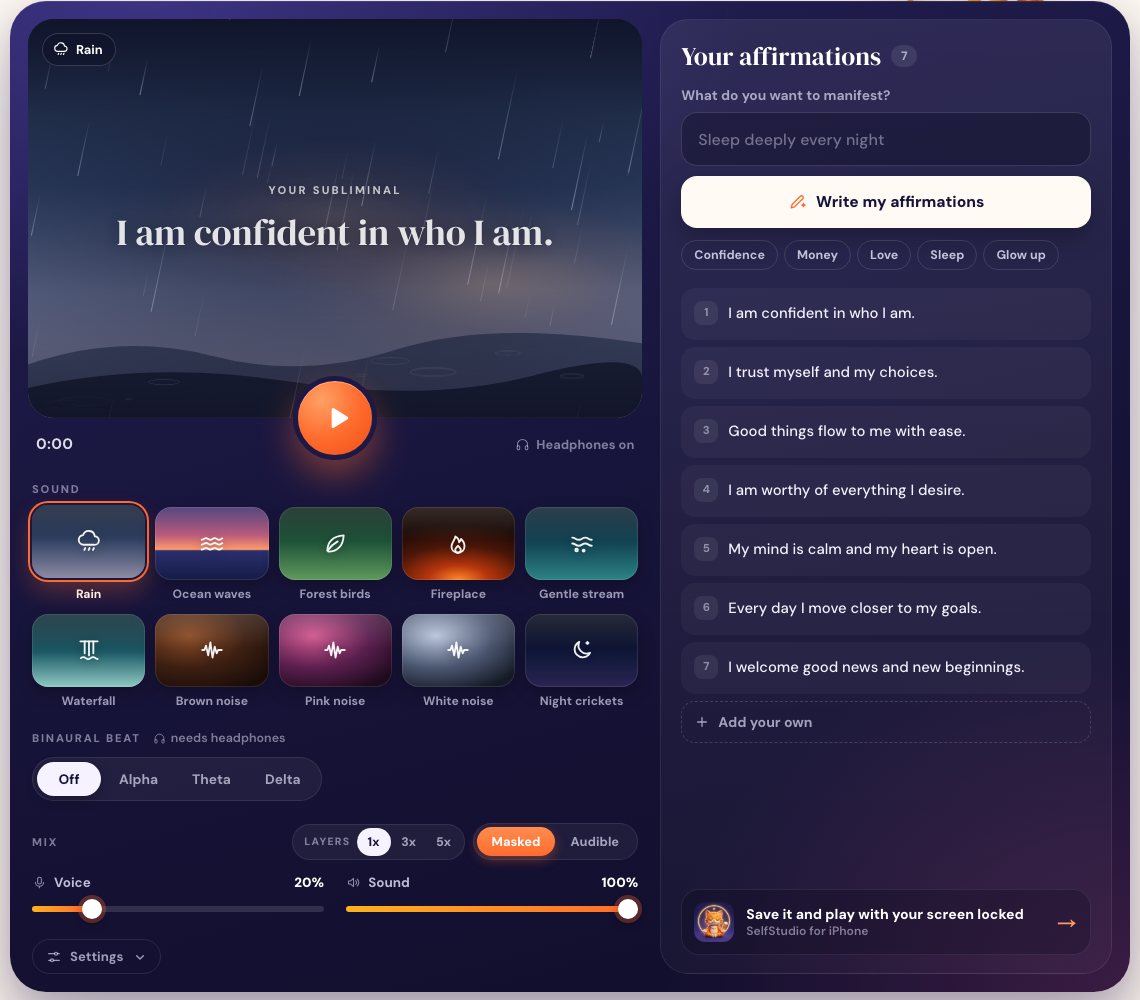
For the soft whisper sound people associate with subliminals, set Layers to 3x. Our guide on how to layer subliminals explains what that does.
A browser tab has limits, though. Nothing is saved to your phone, the subliminal stops when you close the tab, and iPhone tends to pause web audio once the screen locks. It works best for trying the idea with your phone awake on the desk or nightstand.
Method 3: Voice Memos and GarageBand, in your own voice
The first time takes 15 to 20 minutes, and you end up with an audio file in your own voice. Both apps are free from Apple.
- Open Voice Memos and read your list slowly, with a short pause between lines. When you finish, tap the recording, tap the three dots, and choose Save to Files.
- Put a rain or brown noise file in the Files app, or plan to use one of GarageBand's free loops.
- In GarageBand, create a new song with any instrument and switch to Tracks view (the icon of stacked lines). Tap the loop icon, open the Files tab, and drag your recording onto one track and your background sound onto a second track below it.
- A new song is only 8 bars long and will cut your audio off. Tap the plus at the right end of the ruler, tap Section A, and turn on Automatic.
- Drag the track icons at the left edge to the right to show the track controls, then pull the voice track's volume well below the background, until you can only just tell someone is speaking.
- Copy and paste the voice region a few times so the track runs 20 to 30 minutes, and loop the background the same way.
- Go back to My Songs, press and hold your song, tap Share, choose Song, and save it to Files.
Changing a line later means recording and exporting again, and the Files app was not designed for looping an hour of audio overnight.
Which method should you use?
| SelfStudio app | Safari tool | GarageBand | |
|---|---|---|---|
| Cost | Free to start | Free | Free |
| Time to first subliminal | 1 minute | 2 minutes | 15 to 20 minutes |
| Writes affirmations for you | Yes | Yes | No |
| Your own voice | No | No | Yes |
| Plays with screen locked | Yes | Not reliably | Depends on the player |
| Easy to edit later | Yes | Yes | Re-record and export |
If you plan to listen every day, use the app. The Safari tool is a good way to find out whether you like subliminals at all, and GarageBand suits you if your own voice matters more than convenience.
Tips for listening on iPhone
Keep the volume at a level you could listen to for half an hour. You only need headphones for binaural beats; rain or ocean on its own sounds fine through the speaker. Twenty to thirty minutes a day is plenty, and listening daily matters more than long sessions. If you play yours as you fall asleep, our guide to listening to subliminals while sleeping covers timers and volume.
Give it a few weeks before you judge it. There is no fixed timeline and the research is mixed, which we go through in do subliminals work.